
JFT Mk II Assembly Guide
Damaged or Missing Parts All kits and parts are checked before being shipped to you. If something arrives damaged or if your kit is missing a part, please open a support ticket to inquire about a replacement. Missing parts will be replaced at our expense. Damaged parts should be returned for verification. If the part shows signs of use beyond what was necessary to determine that it was damaged, DIY Recording Equipment, LLC reserves the right not to replace the part.
Table of contents
- Required Tools
- Optional Tools
- Component Sorting Sheet
- Standoffs and Header (Bag 1)
- Insert Standoffs
- Populate 8-Pin Header
- Resistors (Bag 2)
- Bend Resistors
- Sort Resistors
- Place Resistors
- Solder Resistors
- Trim Resistors
- Transistors (Bag 3)
- Populate 2SK170 Transistor
- Populate BC327 Transistors
- Quick Question
- Populate BC337 Transistors
- Capacitors (Bag 3 Cont.)
- Populate Small Capacitors
- Populate Large Capacitors
- Final Checks
- Finished!

Thank you for purchasing a JFT Colour!
If this is your first DIY project ever, we recommend reading our Getting Started Guide.
This guide is for the JFT mkII, if you purchased the earlier version see the JFT mkI assembly guide.
Required Tools top
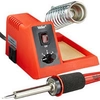
Soldering Iron
We recommend an adjustable-temperature station. The smaller, pencil-style ones that plug directly into the wall do not have enough power to create good joints consistently.
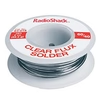
Solder
You can use 60/40 "leaded" solder or lead-free. We recommend 60/40 because it is easier and more forgiving to use.
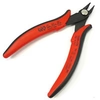
Wire Cutters
A good pair will be sharp and have a fine point for cutting leads down right at the solder joint. Don't use a set of large cutters meant for household wiring.
Optional Tools top
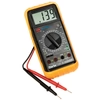
Multi-meter
If you run into problems, a multimeter can come in handy. You can also use it to sort resistors.
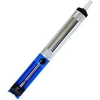
Desoldering Pump
If you accidentally solder something in the wrong place, a desoldering pump can save the day.
Component Sorting Sheet top

To identify and keep track of every part in the kit, download and print the Component Sorting Sheet (PDF).
Standoffs and Header (Bag 1) top

Insert Standoffs top
Note that there are two different ends on the plastic standoffs. The locking end has tabs with a right angle to prevent them from being removed after installation, while the non-locking end has smooth tabs. Insert the locking ends of the standoffs from the bottom of the PCB.

Populate 8-Pin Header top
Insert the 8-pin header into the holes marked “CON1.” Make sure to place the short, silver pins through the bottom of the PCB so that the PCB rests on the black plastic posts. Solder the header from the top of the PCB and do not trim the leads afterward.
Resistors (Bag 2) top

Bend Resistors top
Bend the resistor leads 90 degrees at the body so they can be inserted into the PCB.
Sort Resistors top
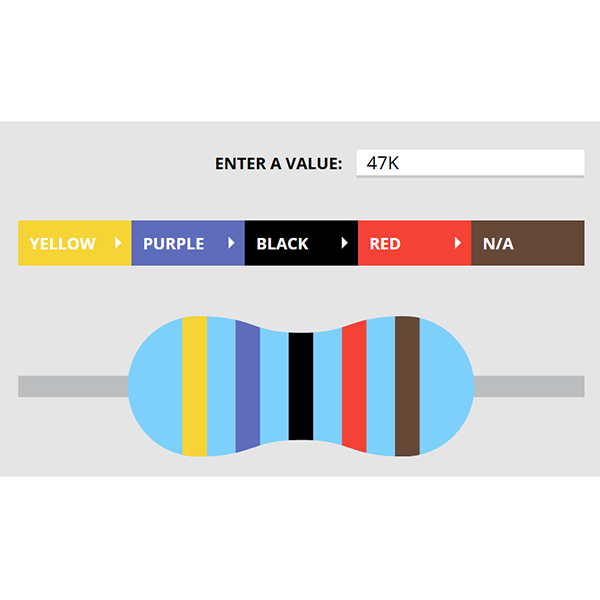
Resistor values are identified by colored bands on the body of the resistor. To sort resistors, use our Resistor Color Code Calculator or test them with a multi-meter set to read resistance. (Pro tip: to measure resistors quickly you can remove the probes from your multi-meter and place the leads of the resistor directly in the probe sockets.)

Place Resistors top
Place the resistors into their respective positions on the PCB. As you place each resistor, bend its leads against the bottom of the PCB so that it stays in place during soldering.

Solder Resistors top
Solder the resistors to the PCB. Observe good soldering technique: heat the pad and lead for 2-3 seconds, apply a small bit of solder, and continue to heat the pad for another 2-3 seconds. The finished joints should be shiny and should have just enough solder to cover the pad entirely.

Trim Resistors top
Use clippers to trim away the excess leads. Clip as closely as possible to the joint without clipping the joint itself.
Transistors (Bag 3) top

Populate 2SK170 Transistor top
Place the 2SK170 transisor it in the position marked with its name on the PCB. Check that it is oriented according to the shape on the PCB, then solder and trim.

Populate BC327 Transistors top
Note that there are two different types of transistors in this bag: some with silver markings on top and some without. Those without a marking are the BC327s. Place them in the positions that have an outline of the transistor instead of a filled-in shape. Make sure the transistors are aligned so the flat edge matches that of the outline on the board. Then solder and trim.
Quick Question top

Populate BC337 Transistors top
Place the transistors that do have a silver marking in the positions with a filled-in shape. Check that they are all oriented according to the shape on the PCB, then solder and trim.
Capacitors (Bag 3 Cont.) top

Populate Small Capacitors top
Place the smaller capacitors in their respective places. These capacitors are not polarized and therefore can be placed in either direction. Solder then trim the leads.

Populate Large Capacitors top
These capacitors are polarized, so they must be placed in a certain direction. The positive lead is slightly longer, while the negative lead is marked with a stripe on the body of the capacitor. Place the capacitors with the positive lead in the pad next to the "+" marking on the PCB. Double check their orientation, then solder and trim.
Final Checks top
Before you wrap up, check the following things:
-
Capacitor orientation: Is the stripe on the cap on the opposite side from the "+" marking on the PCB?
-
Transistor orientation: Does the shape of the transistor match the outline on the PCB?
-
Resistors: Are all the resistors in the correct positions?
-
Soldering: Is every solder joint shiny and clean? If one is cloudy or misshapen, try reheating it for 8 seconds and adding a tiny bit more solder.
-
Trimming: Are all of the excess leads trimmed down as close to the joint as possible?

Finished! top
Congratulations on finishing your build!
Have general feedback or a question? Get in touch.
Missing a part or need replacements? Submit a Parts Request.
Something not working right? Don't worry, we have plenty of troubleshooting resources to help you figure it out.
If you've worked through the troubleshooting guides above and are still stuck, reach out through the troubleshooting support form.
